Showing posts with label math. Show all posts

Sunday, October 23, 2011

Five Awesome Activities for Teaching Math with Your Interactive Whiteboard


1. Use the interactive angle to teach your students how to measure angles. The name says it all - this virtual manipulative is an excellent tool for getting students involved in building acute, right, and obtuse angles. The buttons on this tool allow students to build or take away one, five, or ten degrees at a time.


2. Show the relationships among the radius, diameter, and center of a circle with the interactive circle. Click on the circle to plot a point and then click the center to draw a radius. Define radius, click RESET, and then click on circle and the point directly across from it to create a diameter. Ask students to tell you the relationship between the radius and diameter. A full-featured version of the interactive circle is available in the Geometry Whiteboard Teacher Pack.


3. Graph daily temperatures using a line graph tool. Show your students how line graphs show change over time by making a table of the weekly high temperatures and then dragging and dropping points on a grid to create the graph. MisterTeacher's line graph tool is part of the Representing Data Whiteboard Teacher Pack.


4. Build growing patterns out of triangles and rectangles. Use the Pattern Tool to create two rows of shapes that show a pattern growing from just a single triangle and rectangle to a triangle and two rectangles. Have students come to the whiteboard and drag the shapes into place to complete the next row of the pattern.


5. Represent integers less than zero with a scuba diver. Have your students use the drag and drop diver below the water to represent numbers less than one. Call out depths and have students move the diver up and down the number line. The scuba diver is part of the Integers Whiteboard Teacher Pack.


Technorati Tags: | |

Sunday, October 16, 2011

Free Interactive Whiteboard Resources @ Misterteacher.com

Take advantage of the free resources for your interactive whiteboard at MisterTeacher.com:

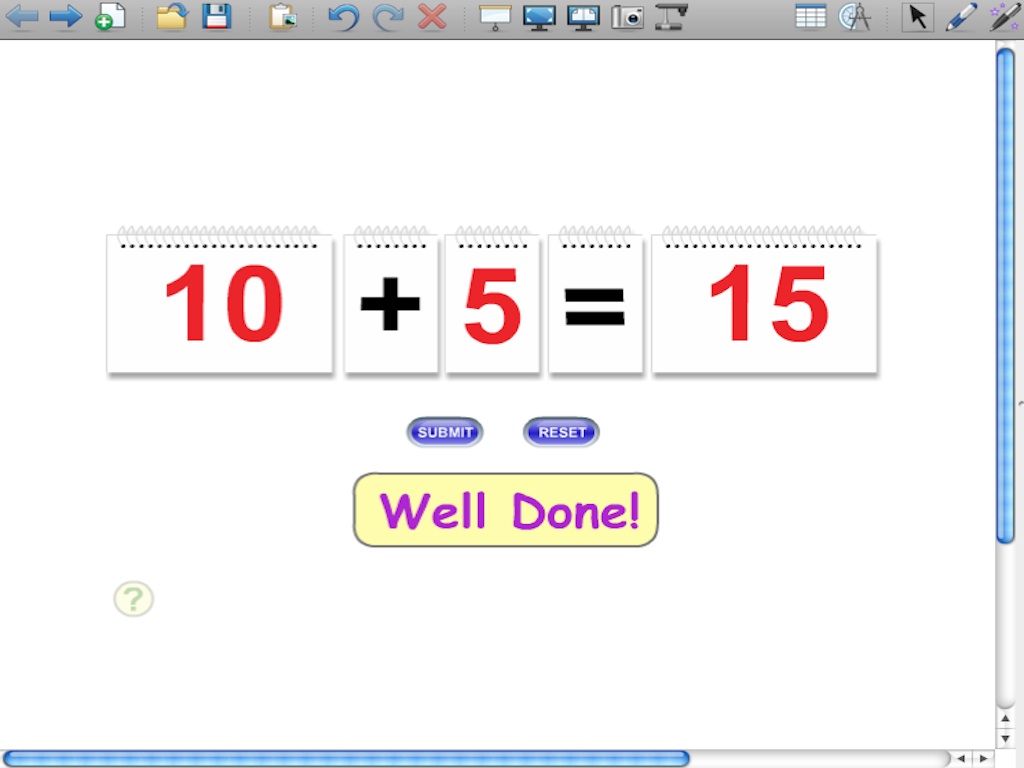
  • Math Facts Flip Chart - This virtual manipulative is now free! A great resource for teaching addition, subtraction, multiplication, & division facts. This tool works just like a modular flip chart and is perfect for whole-class demonstrations, small group work, or learning center practice. Push the submit button for instant feedback.


  • Fractions Flip Chart - This virtual manipulative is now free! Display this resource on your interactive whiteboard and show your students fractional parts of a circle, fractions, decimals and percents. Push the submit button for instant feedback.

  • Alphabet Symmetry Tool - The ultimate tool for teaching transformations! Display this resource on your interactive whiteboard and use letters of the alphabet to teach linear and rotational symmetry as well as reflections, rotations, and translations.


  • Interactive Food Chains & Webs - Eight awesome Flash mini-movies teach your students the organization of simple food chains & food webs. Get your students out of their seats and up to the whiteboard!


All of our WebQuests & student activities are free:

Sunday, October 02, 2011

Venn Diagrams for Teaching GCF & LCM


For many teachers, the Venn Diagram has become an indispensable instructional tool. A few years ago I discovered (for myself) how to use the Venn to teach greatest common factor and least common multiple.

A few years later I created a few Venn Diagrams using Adobe Flash so I could teach GCF & LCM on my SMARTBoard. Just click on the link below and you can use them too. A SMART Notebook gallery collection file will download to your desktop. Open the file and the Venn Diagrams are automatically added to your My Content folder.


You can download 4 more Venn Diagrams at MisterTeacher.com. In addition, you'll find 4 more activities on even/odd numbers and prime/composite numbers.


Check out more free SMARTBoard mini-movies: Number Properties | Virtual Manipulatives


Sunday, September 25, 2011

Right, Acute, Obtuse Angle Flash Cards for SMART Notebook


Teaching angles used to be something that I found very difficult. I remember trying numerous ways to get my students to see that the measure of an angle was determined by how much it opened, or rotated on its vertex.

Teaching this concept has become much easier on a SMARTBoard. Flash animations like the Angle Flash Card Mini-Movies pictured above show angles rotating on their vertices, making the concept come alive for students.

Try out these mini-movies on your SMARTBoard with this free download. Just click on the link below and a SMART Notebook gallery collection file will download to your desktop. Open the file and the angle flash cards are automatically added to your My Content folder.


Types of Angles Flash Cards


Check out the rest of MisterTeacher.com's geometry Flash mini-movies with the Interactive Geometry Whiteboard Teacher Pack. It includes many more angle angle animations, including the Interactive Angle. You'll also find mini-movies that teach circle concepts as well basic geometry concepts like lines, segments, parallel, perpendicular and more.

Thursday, August 18, 2011

Fractions to Decimals to Percents Flip Chart Virtual Manipulative


Fractions to Decimals to Percents - use your SMARTBoard to teach your students these important conversions with the new Fraction Flip Chart Virtual Manipulative. Based on the popular manipulative, this flip chart features four modules that display visual fraction models, fractions, decimals, and percents. Show only the visual fraction and fraction and then continue on to equivalencies with decimals and percents and then click the SUBMIT button for instant feedback. Great for whole-class lessons or for use with small group instruction.

As with all of MisterTeacher's products, once you make your purchase, download and open the file, the flip chart is automatically added to the My Content folder in SMART Notebook! You'll be able to add it to your lessons whenever you want and write on it and resize it. Your purchase also comes with a Notebook file with directions and a list of Math Standards.


Sunday, August 14, 2011

Math Facts Flip Chart Virtual Manipulatives


Use the Math Facts Flip Chart Virtual Manipulative to create number sentences to practice addition, subtraction, multiplication, and division facts and then click the SUBMIT button for instant feedback. Great for whole-class lessons or for use with small group instruction. Contains two number charts with numbers 0 - 99; one with 0 - 9; one operator chart with the operations +, -, x, and ÷; and one with an equals sign.

As with all of MisterTeacher's products, once you make your purchase, download and open the file, the flip chart is automatically added to the My Content folder in SMART Notebook! You'll be able to add it to your lessons whenever you want and write on it and resize it. Your purchase also comes with a Notebook file with directions and a list of Common Core Standards.


Sunday, July 24, 2011

Direct to Notebook SMARTBoard Resources

It's now easier than ever to increase the number of resources in SMART Notebook's My Content folder. Beginning this August all Whiteboard Teacher Pack downloads from MisterTeacher.com will come with a gallery collection file that contains the Flash mini-movies. Open the file and the Flash mini-movies that you have purchased are automatically added to the My Content folder. The mini-movies will show up in their own file and be instantly available to add to your SMART Notebook lessons.


New Licensing Options


Also this fall, MisterTeacher.com will be offering new licensing options for the Whiteboard Teacher Packs.
  • Classroom License - This option allows teachers unlimited use of the Flash mini-movies on an interactive whiteboard within one classroom. The mini-movies can be copied from one computer to an unlimited number of computers within the same classroom.
  • Site License - This license allows a download to one computer and then the option to save and share the Flash mini-movies, teacher guides, and printable assessments with all teachers throughout one school building. This is an incredible deal for technology coordinators, curriculum specialists, department chairs, or anyone else looking to purchase SMARTBoard resources for a large group of teachers at a very reasonable price.

New Whiteboard Teacher Pack Bundles

Several of the Whiteboard Teacher Packs have been combined to form discounted bundles.
  • Math Whiteboard Teacher Pack Bundle - Purchase every whiteboard teacher pack at a discounted rate. With over 200 Flash mini-movies, dozens of interactive activities, and over 60 printable assessments, this bundle will instantly enhance your SMARTBoard lessons!
  • Fraction, Decimal, Percent Bundle - The fraction, decimal, & percent teacher packs were combined for this bundle. Get 0ver 60 mini-movies for a fraction of the price!
  • Geometry & Transformations Bundle - Teach a number of geometry standards from the early grades through high school. This bundle includes three virtual manipulatives!

Sunday, May 15, 2011

New Pattern Tool Whiteboard Teacher Pack for K-2 Teachers

All new for K-2 teachers, the Pattern Tool Whiteboard Teacher Pack includes a virtual manipulative that teachers can download and insert into their interactive whiteboard software. With this tool, you can teach your primary (K-2) students how to analyze patterns, build common patterns (ab, aab, abc, etc.), extend them, create similar patterns. You can also create growing patterns and build student capacity in sorting and classifying shapes.

Purchase the Pattern Tool Whiteboard Teacher Pack and the Pattern Tool is yours to keep. Keep it on a folder on your computer or add it to the My Content folder in SMART Notebook. Add as many mini-movies to your activities as you want and write on them, resize them, and/or put multiple mini-movies on the same slide.

Preview and download the mini-movie or take your instruction further with the Pattern Tool Whiteboard Teacher Pack. This packs include the virtual manipulative, printable worksheets, and a teacher's guide. More information.

Tuesday, January 04, 2011

New Math Mini-Movies for Your SMARTBoard Lessons

Number Properties

Use your interactive whiteboard to teach the distributive, commutative, and associative properties with updated mini-movies available for free at MisterTeacher.com. Interactive and highly visual, your students will watch numbers switch places (commutative), parentheses move from one group of numbers to another (associative), and see how numbers outside of parentheses distribute.


A number of new mini-movies have been added that will allow you to turn your interactive whiteboard into a tool for creating bar, line, and circle graphs. With these animations you can use your own data teach your students to:
  • read & interpret bar graphs with intervals of 1, 2, 5, and 10.
  • graph temperature data over the course of a week or year on a line graph.
  • create circle graphs by estimating sizes of sectors on the graphs.
The Representing Data Whiteboard Teacher Pack includes all eight mini-movies, a teacher guide, and printable assessments.


Check out MisterTeacher.com's SMART Accredited Math Whiteboard Teacher Packs
  • Decimals - Models, comparing, and ordering
  • Geometry - Lines, angles, and circles
  • Fractions - Models, comparing, and ordering
  • Integers - Models, comparing, and ordering
  • Dominoes - Addition, subtraction, and family of facts

Prepare for Standardized Tests with Online Student Activities


Sunday, November 28, 2010

Transformations on Your SMARTBoard

The word transform means "to change." In geometry, a transformation changes the position of a shape on a coordinate plane. Teach your students how to visualize the moving of a shape from one position to another with the Transformations Whiteboard Teacher Pack. Appropriate for grades 4 - 8, you can use the Flash mini-movies to teach students how to:

  • Predict and describe positions and orientations of two-dimensional shapes after transformations such as reflections, rotations, and translations.
  • Draw the results of translations, reflections, and rotations of objects in the coordinate plane, and determine properties that remain fixed.
The teacher pack includes the following:


Monday, November 01, 2010

Old Dogs, New Math: Homework Help for Puzzled Parents

I love math, but I haven’t always. For all the years of my life preceding my education as a teacher, I despised the subject. The rules, equations, and abstract concepts had little meaning to me and were sometimes beyond my comprehension. It wasn’t until I started my training as a teacher that I began to look at math differently. In my classes, I relearned many of the concepts that I found so unappealing through activities that brought them to life. I was taught to understand what I was learning so that I could later pass that understanding on to my students.

Unfortunately, the opportunity to learn math in this way does not exist for the parents of many children. Until now that is. Old Dogs, New Math: Homework Help for Puzzled Parents is a wonderful resource for parents struggling to find ways to help their children with the math they’re expected to learn at school. This book offers a short course on the concepts taught in today’s elementary schools and does so in a way that brings parents up to date on many of the new techniques teachers use to teach them. I have to admit that as a fifth grade teacher I was surprised (and excited!) to see so many of the strategies that I have used time and again in my classroom (and many more that I haven’t used but will soon!).

Do not confuse this book with a boring survey of math though; each chapter is full of engaging text, pictures and diagrams, sample questions, and engaging math games. One of the book’s best features is its emphasis on understanding the mistakes that kids make on their math homework. In each chapter, parents learn the common challenges that kids have with specific concepts and can even see real mistakes that they make in solving certain problems.

Old Dogs is a very worthwhile read and a handy book to keep around until the last of your children heads off to middle school. It does for parents what my training in education did for me—take the fear and loathing out of math and make it an enjoyable subject.

SMARTBoard Mini-Movies - $0.99 through Thanksgiving!


Wednesday, September 29, 2010

New Virtual Manipulatives for Math Teachers


Virtual Manipulatives


Incorporate even more interactivity into your math lessons with new virtual manipulatives at MisterTeacher.com. Teachers can find a set of ten new manipulatives created for students grades K-12. Each one is designed to be projected onto an interactive whiteboard and shared with small or large groups of students. Included are a coin tool, the interactive angle, a tangram tool, and more.


Click here to check out the virtual manipulatives.


New Science Mini-Movies Added to the Library


Now you can engage your students in learning about clouds, electricity, photosynthesis, prisms, and more. New science mini-movies allow you teach:

Check out the science mini-movie library


Wednesday, August 25, 2010

Interactive Whiteboard Teacher Packs

The 2010-11 school year is here. Enhance your interactive whiteboard lessons with MisterTeacher’s new Interactive Whiteboard Teacher Packs. These new teacher packs feature highly engaging resources to include in your lessons combined with new guides on how to use them:

  • Flash Animated Interactive Whiteboard Mini-Movies
  • A Teacher's Guide Full of Engaging Ideas for Using the Mini-Movies on Your Interactive Whiteboard
  • Printable Worksheets that Help You Assess the Concepts You Will Be Teaching with the Mini-Movies

The library of teacher packs is growing and will soon cover concepts spanning all grade levels in both math and science. Here's what currently on the site:

In addition, there are more math and science themed interactive whiteboard mini-movies that are not yet part of teacher packs. A portion of them are available as free downloads. Click here to check out all the Whiteboard Teacher Packs


Don’t forget about MisterTeacher’s web-based student activities: science, social studies, and math activities for elementary through middle grades students.


Tuesday, June 22, 2010

A Few Interesting Math and Science Apps for Mobile Phones

Figuratively speaking, the world we live in has been cut down to size, thanks largely to the extensive reach that the tiny mobile phone has allowed us. With this small device, it is now possible to do just about anything – communicate, entertain, learn – the list is endless. The more sophisticated of this breed, the smartphones, are even more convenient as all-in-one tools because they have operating systems that allow you to use them similar to computers. So if you own one of these gadgets and are on the lookout for interesting math and science apps to try out, here is a compilation of a few apps that I think are useful:

For the iPhone:

  • Get all the Science: If you’re a regular subscriber to the RSS feeds of major science publications online, then this is the app for you. It brings pages from websites like Nature, New Scientist, and others and displays them on your phone for your convenience.
  • Uranus: This app is GPS-enabled and allows you to view information about the night sky from any place on earth.
  • Scientific Calculator: You don’t have to shell out money any longer for a scientific calculator; just download this free app onto your iPhone.
  • Pi Cubed: I love mathematics, so this app had me really excited – it allows you to actually use your iPhone’s screen as a notepad on which you can do Math equations. The interface supports animation and touch input, so it’s easy to enter and delete numbers and symbols.

For the Android:

  • Elements: An easy ready reckoner for the periodic table, this app helps you look up not just the names of elements and their atomic numbers, but also their melting points, atomic radii and more.
  • HandyCalc: A good scientific calculator app written for the Android OS.
  • SciencePal: This app allows you to access information not just about the periodic table, but also about scientific constants, the solar system, and nuclides.

For the BlackBerry:

  • Math Trainer: This app is both fun and informative for kids and adults; it allows you to practice basic mathematics in three modes – exam, timed and training.
  • Viigo: This app is basically an RSS aggregator, but you can set it to read all the science blogs and sites that you’re passionate about so you stay on top of all the latest news.

For Windows Mobile:

  • SpaceTime Mathematics: This app is probably the most advanced mathematical and scientific calculator in the mobile world; it includes features for plotting, symbolic calculus and scripting besides other functions.
  • Calc Pro: Another basic math-based app for Windows Mobile phones, this features options for graphing, financial calculations, standard computations, unit conversions, statistical calculations, and much more.

There are many other science and math apps for mobile devices, most of them having been written for the iPhone for obvious reasons, but the Android is soon catching up as a popular OS. So no matter what the brand of your device, you’ll be able to find suitable apps.


This guest post is contributed by Anna Miller, who writes on the topic of online degrees . She welcomes your comments at her email id: anna.miller009@gmail.com


Check out: Interactive Whiteboard Mini-Movies - Flash Animations for your Interactive Whiteboard


Friday, June 18, 2010

Learning On the Go: Mobile Math Resources for Your Kids

Both math and science are subjects that are perhaps most difficult to teach to young learners, especially during the pivotal late elementary and middle school stages. What's the best way to reach out to them? Perhaps the most effective method is to use the medium by which young learners communicate--mobile devices. According to a national survey from CTIA and Harris Interactive, cell phone use comprises almost half of a teen's social life, and four out of five teens carry some form of mobile device. This figure represents a 40% increase since 2004. In the final prognosis--when you want to get a kids' attention, if can't beat, then join, as the saying goes.


Aside from the ever-increasing popularity of the iPhone and its family of related gadgets, there are several STEM learning resources for pre-teen and teen students beyond Apple products. One such application is Math4Mobile. This cell phone application was developed in 2007 by Prof. Michal Yerushalmy, of the Institute for Alternatives in Education of the Faculty of Education at the University of Haifa. When the app is installed on a cell phone, it enables users to perform mathematical functions as advanced calculus and as basic as elementary geometry. What's more, it's compatible with almost all cell phones.


Another interesting mobile device created earlier this year is the TINspire Navigator. Developed by Texas Instruments, the device enables math and science educators to facilitate classroom collaboration and discussion. Similar to how online schools interact virtually. This particular learning device is a variation on the concept of the cell phone. Students will likely respond to such technologies well.


The numbers of elementary and middle school STEM learning resources are vast. And sifting through the Internet is a great way to begin finding new ways to teach the same thing. The bottom line, however, is to make sure these resources align with your students interests and personal technologies. They'll be more willing to employ new methods if they're approached with something they are already familiar with.


By-line:

This guest post is contributed by Tim Handorf, who writes on the topics of online colleges. He welcomes your comments at his email Id: tim.handorf.20@googlemail.com.


Wednesday, March 10, 2010

New Math Mini-Movies for Your Interactive Whiteboard

Percent of a Number

Teach your students what it means to find a specific percent of a number. Drag the red bar to any percent from 10 to 100 and find the number that matches it. Find percents of 10, 20, 30, 40, & 50. Math Mini-Movies


Decimal Models

Teach a number of different decimal concepts with this interactive decimal model. Display the model on your interactive whiteboard and pull the blue slider to model tenths and then click the button to show an equivalent decimal to the hundredths place. Great for comparing decimals, modeling mixed numbers, and more. Math Mini-Movies


Interactive Circle

With the interactive circle you can create a radius, diameter, chord, tangent, or sector. Make up problems for your students to solve with little to no preparation -- the interactive circle does the drawing so you can focus on the numbers. Math Mini-Movies


Also new this month: Linear and Square Units Mini Movies


Thursday, February 04, 2010

Mangahigh: A New Way to Study Math

Math is arguably one of the most essential subjects to study in school. Unfortunately, it's also the subject that tends to cause the most anxiety for students. After recognizing this problem, a group of mathematicians and game designers created Mangahigh.


Mangahigh, one of the world's first games-based learning sites, provides casual games that make learning math fun and easy. The games are curriculum-compliant and adapted to the individual student so that they are challenging but not overwhelming.


While playing games, students are introduced to mathematical concepts in a logical order based on their age and skill level. Mangahigh provides individualized lesson sets and to-do lists to keep each user on track. Students also have the option of adjusting their own syllabus to get extra practice with problem areas.


The safety factor is another nice feature of the site. Mangahigh does not have advertising of any kind. They also avoid chat, messaging, and user-generated content so that there is no chance of a third party contacting a Mangahigh user.


The site is designed for kids between the ages of 10 and 16, but would undoubtedly benefit both younger and older children. Students and parents can try the site by registering for a free user account. This account offers access to a limited number of games and learning activities as well as the ability to save status, points, scores, levels, and achievements.


Users who would like full access to the site must pay a membership fee. This fee can vary depending on subscription length and the number of students who will be using Mangahigh. With the site's current special launch discount, fees average somewhere around $15 per student. Memberships are designed primarily for schools. However, a one-student or family subscription can be purchased if you contact the site directly.


Guest post from education writer Karen Schweitzer. Karen is the About.com Guide to Business School. She also writes about online college classes for OnlineClasses.org.


Technorati Tags: | |

Sunday, January 31, 2010

New (& Improved) Math & Science SmartBoard Mini-Movies


New Drag and Drop Graphs

I'm very excited to announce three new amazing mini-movies that will allow teachers to really engage their students in lessons on representing data. With these mini-movies, you'll be able to dynamically create three types of graphs: a bar graph, a line graph, and a circle graph. Input your own data into a table, press DONE, and then have your students come to the interactive whiteboard and drag bars, lines, and pie pieces into the correct spots. Once they are finished, have them click the CHECK button to get immediate feedback.

You'll find these new drag and drop graphs in the math mini-movies section of misterteacher.com.

Updated Basics of Geometry Resources

Check out the new basics of geometry student activities. These interactive activities feature play and pause SmartBoard mini-movies that allow students to learn the concepts at their own pace. The mini-movies are also perfect for downloading and using in your interactive whiteboard lessons.
Life Science - Drag and drop food webs and food chains

The newest additions to the science mini-movie library are drag and drop food webs and chains. Teach your students about the flow of energy through a food chain as well as the meaning of words like producer, consumer, herbivore, and carnivore by having them drag organisms to the correct place on the food chains and webs.
Celebrate African American Heritage

Teach your students about the experiences and contributions of African Americans slaves with the web-based unit Slavery in America from misterteacher.com. Each page is printable, making it easy to teach your students about the lives of slaves, negro spirituals, the Underground Railroad, and how African Americans eventually got their freedom.

Thursday, January 07, 2010

New Drag and Drop Mini-Movies on misterteacher.com

As of this mailing, there are over 300 subscribers to the misterteacher.com newsletter. If each of the current subscribers were to send this email to just one more educator that list would grow to over 600! Please take a few seconds and share the site with someone who may benefit from using the resources.

Bookmark and Share

New Drag and Drag Drops


The majority of the SMARTBoard mini-movies on misterteacher.com are defined by their simple interactivity. Push a button and watch a concept come alive through animation. It's time to introduce a new generation of interactivity: drag and drop mini-movies. These new animations allow teachers and their students to drag multiple items across the screen of an electronic whiteboard, push a button, and get instant feedback.

In the weeks and months ahead, watch out for tons of math and science drag and drops (food webs and some AWESOME DRAG AND DROP GRAPHS!). Right now though, check out a few examples from the first bunch that has been added to the site:
By the way, if you're planning to teach fractions and decimals soon, there are almost 30 new mini-movies on comparing and ordering fractions and decimals. Also, there are several new worksheets:
Coming up in the weeks ahead:
  • A SchoolTube movie that tells how to use the mini-movies in the classroom.
  • More Worksheets
  • More and more drag and drop mini-movies.