Creating effective presentations seems to be all the rage right now. Garr Reynolds and his Presentation Zen blog are incredibly popular and the Slideshare website has thousands of presentations (many of them on presentations) and a large community of users sharing them. With all the SmartBoards in classrooms now it's become very important that teachers jump on the bandwagon and learn how to create presentations that are memorable and easily understood. I've been riding the wagon for a few years now and this past February I delivered my own presentation on the topic. You can check out on Slideshare or just click through it below. Let me know what you think.
Technorati Tags: education | learning | presentations | Powerpoint
Check out: Mini-Movies for Your SmartBoard
Showing posts with label presentations. Show all posts
Showing posts with label presentations. Show all posts
Sunday, March 08, 2009


Monday, September 29, 2008
Another Dreadful Presentation
I used to love district inservice days. It's nice to be in the school building with no kids and no pressure to teach. The day seems to be relaxing in a way. However, my tune is starting to change. Today the teachers in our district were forced to sit through a three hour presentation on culturally responsive teaching that was in a word, dreadful.
Don't get me wrong, the presenters obviously knew their material and had given the presentation multiple times (or at least it seemed). They were articulate and, in general, very good public speakers. But they had a great deal to learn about preparing and delivering a quality presentation.
First of all, although we were supposed to be learning about culturally responsive teaching (the new buzzword for multicultural education, or teaching in a manner that respects the culture of your students), we endured 2 1/2 hours of information dumping on the flat world and the importance of teaching 21st Century skills to prepare our students for it. Most of us were already VERY familiar with these concepts. In addition, we were given no strategies, and only three basic example lessons. Obviously, the presenters did not know their audience very well--we were already familiar with the information and as anybody who works with teachers knows, we want to know how to apply what we are learning in our classrooms.
Second, the presenters could have improved their delivery dramatically. On a few occasions, one of them actually read from the slides. This is excusable if the text is short, but the text covered almost the entire slide. They also made very little effort to engage us, to get and keep our attention.
Finally, the design of the slides needed work as well. Most of them had very little visual support for all the text and bullet points. The visuals that were used were often clip art (yikes!). During the presentation, I took some time to look through the handout and think of ways that I could improve some of the slides. Simplicity was clearly missing. Many slides could have been improved by removing some of the text and rewriting it as one sentence that made a simple statement for the presenters to work from. As a result, we in the audience would not have been spending our time reading the slides but listening to what the presenters had to say.
One of my goals this year is to incorporate many presentation strategies into my teaching. I've stated before that my teaching has become a little more traditional because of my SmartBoard. It's important then that I make every effort to design my lecture-based lessons so that they incoporate as many strategies as possible to grab and keep the attention of my students so that they actually learn what I'm teaching.
Check out: Constitution Webquest | Rainforest Webquest | Tessellations
Don't get me wrong, the presenters obviously knew their material and had given the presentation multiple times (or at least it seemed). They were articulate and, in general, very good public speakers. But they had a great deal to learn about preparing and delivering a quality presentation.
First of all, although we were supposed to be learning about culturally responsive teaching (the new buzzword for multicultural education, or teaching in a manner that respects the culture of your students), we endured 2 1/2 hours of information dumping on the flat world and the importance of teaching 21st Century skills to prepare our students for it. Most of us were already VERY familiar with these concepts. In addition, we were given no strategies, and only three basic example lessons. Obviously, the presenters did not know their audience very well--we were already familiar with the information and as anybody who works with teachers knows, we want to know how to apply what we are learning in our classrooms.
Second, the presenters could have improved their delivery dramatically. On a few occasions, one of them actually read from the slides. This is excusable if the text is short, but the text covered almost the entire slide. They also made very little effort to engage us, to get and keep our attention.
Finally, the design of the slides needed work as well. Most of them had very little visual support for all the text and bullet points. The visuals that were used were often clip art (yikes!). During the presentation, I took some time to look through the handout and think of ways that I could improve some of the slides. Simplicity was clearly missing. Many slides could have been improved by removing some of the text and rewriting it as one sentence that made a simple statement for the presenters to work from. As a result, we in the audience would not have been spending our time reading the slides but listening to what the presenters had to say.
One of my goals this year is to incorporate many presentation strategies into my teaching. I've stated before that my teaching has become a little more traditional because of my SmartBoard. It's important then that I make every effort to design my lecture-based lessons so that they incoporate as many strategies as possible to grab and keep the attention of my students so that they actually learn what I'm teaching.
Check out: Constitution Webquest | Rainforest Webquest | Tessellations
Friday, July 25, 2008

Thursday, July 24, 2008
A Dose of Inspiration (Hopefully)
Below is my entry into the Slideshare World's Best Presentation Contest--Cultivating Creativity in the Classroom. It is not exactly what I hoped it would be. The original font that I used did not make it through the upload (it was a great one too--I think it changed the whole tone of the slide show). I also had to remove several slides because the PPT file was too large (75mb!!) to upload.
I'm not sure how big a role standardized testing plays in the everyday life of a teacher in other states, but here in Ohio no curricular decisions are made without mentioning the words Achievement Test. Even in my school district, which continues to have success on the test each year. This presentation is meant to be a quiet wake up call for teachers. Though it barely scratches the surface of what we know about creativity, it will hopefully awaken a few folks to the idea that preparing for state tests doesn't have to consist entirely of paper/pencil drill and practice drudgery. It's possible to teach many concepts by allowing students to create products that display their learning. Another hope of mine is that teachers will begin to think of themselves as creative and begin to search for ideas in the world around them with the hope of improving their instruction.
I also wanted to provide a few links to the authors that I quote in the presentation:
Cultivating Creativity in the Classroom
I'm not sure how big a role standardized testing plays in the everyday life of a teacher in other states, but here in Ohio no curricular decisions are made without mentioning the words Achievement Test. Even in my school district, which continues to have success on the test each year. This presentation is meant to be a quiet wake up call for teachers. Though it barely scratches the surface of what we know about creativity, it will hopefully awaken a few folks to the idea that preparing for state tests doesn't have to consist entirely of paper/pencil drill and practice drudgery. It's possible to teach many concepts by allowing students to create products that display their learning. Another hope of mine is that teachers will begin to think of themselves as creative and begin to search for ideas in the world around them with the hope of improving their instruction.
I also wanted to provide a few links to the authors that I quote in the presentation:
- Out of Our Minds: Learning to Be Creative by Ken Robinson
- Thinkertoys by Michael Michalko
- A Whack on the Side of the Head by Roger von Oech
- Beyond Bullet Points by Cliff Atkinson
- An Inconvenient Truth starring Al Gore and his amazing slideshow
- Presentation Zen
Cultivating Creativity in the Classroom
view presentation (tags: creativity teachers classroom education)
Technorati Tags: education| Slideshare | creativity
Technorati Tags: education| Slideshare | creativity
Saturday, March 24, 2007
Working with Digital Cameras and a Projector
 After winning the Best Buy Teach Award I was able to purchase 8 Kodak Easyshare digital cameras for a project titled the Online Science Fair. The fair isn't set to begin until May so I've been trying to dream up ways to put the cameras to use until then. Normally this wouldn't be too difficult; however, the computer labs in my school are booked solid through the month of April so that teachers can use our test prep software to get kids ready for the Ohio Achievement Test. When you're working in a digital (paperless) world, computers and digital cameras go together.
Luckily, each camera came with an AV cable. I can plug one end of this cable into my camera and the other into my LCD projector and actually show photos from the camera on my projector. In addition, I can also show videos that I record with the camera on the big screen.
So it seems that computers are not absolutely necessary to put digital cameras to use in the classroom. I have yet to have my students take photos on the cameras and present them for the class, but I'm already planning projects that will allow students to use the cameras in this way.
Another use for the camera is as a document camera/projector. When you plug the AV cable in and turn on the camera, the color display on the back of the camera is projected. With the camera it's possible to get a close up of not only documents but small objects that are hard to display to the class.
Read more about digital cameras in the classroom at misterteacher.com.
Technorati Tags: education | digital cameras | Kodak
Tessellations | Similar Figures | Symmetry in Nature
Saturday, December 30, 2006
Wednesday, December 13, 2006
Live from SOITA: Google Tricks from Tammy Worcester
I got in a litte late, but I still managed to pick up some tricks from the SOITA Conference's featured speaker Tammy Worcester. I happened to stop in right as she was showing some of lesser known features of Google. You probably already know that you can use the search engine as a calculator, but did you know that you can also use it to do conversions?
Need a PowerPoint, but can’t find the time to create one for class. A Google advanced search allows you type in a keyword and choose to have the search return only PowerPoint files. Here's how to do it:
Technorati Tags: education | teachers
Check out: Spreadsheets in the Classroom | Classroom Blogging | Alphabet Geometry
- Want to convert 32 degrees F to Celsius? Simply type the following: 32 f to c and Google returns the following
32 degrees Fahrenheit = 0 degrees Celsius
- How about converting metric measures to customary? Try typing 3 m to ft and Google returns the following
3 m = 9.84251969 feet
Searching for PowerPoint SlideshowsNeed a PowerPoint, but can’t find the time to create one for class. A Google advanced search allows you type in a keyword and choose to have the search return only PowerPoint files. Here's how to do it:
- Click on Advanced Search.
- In the Find Results box, type your keyword (Tammy's was rainforests).
- Click on the Find Format drop down menu and choose PowerPoint.
Technorati Tags: education | teachers
Check out: Spreadsheets in the Classroom | Classroom Blogging | Alphabet Geometry
Wednesday, December 06, 2006
Blogs, Blogs, and More Blogs
Since I will presenting my world famous Blogging Across the Curriculum session at the SOITA Conference on Wednesday, my mind is on blogs and as a result this post will be full of blogging resources.
Check out: Digital Cameras in the Classroom | Spreadsheets in the Classroom
- The Presentation: First is a link to my presentation on SlideShare. Unlike the last presentation I uploaded, I have added some annotated commentary to each slide in the comments section.
- Resources from the presentation.
Why blog?
- Blogs support inquiry-based and project–based learning
- You can use blogs to develop an online community that extends beyond the classroom walls
- Less paper – for the teacher and the student
- The comment link:
- Feedback is in front of students so they can use it immediately
- Students can get feedback from multiple sources: parents, teachers, students, etc.
- Students can find new sites and link to them
- Blogs bring the digital world to the classroom
- Makes work public—parents, teachers, school community can see entries
- Classroom blogs make for quick and easy assessment
- Students can learn from each other
- Students can collaborate with each other
- It gets students writing in mathematics
- Assignment possibilities are endless:
- Scribe posts
- Expert posts
- Podcasts
- Photo Journals
- More…
- Teachers can easily create Webquests with them
- Blogs require no technical skill (i.e. programming or coding skills)
- You can use blogs to create digital portfolios
- A blog can act as a discussion forum
- Dated entries make it easy to create a journal from a blog
- If caution is used, blogging is extremely safe for students
Check out: Digital Cameras in the Classroom | Spreadsheets in the Classroom
Thursday, November 30, 2006
Paper Airplanes, Online Presentations
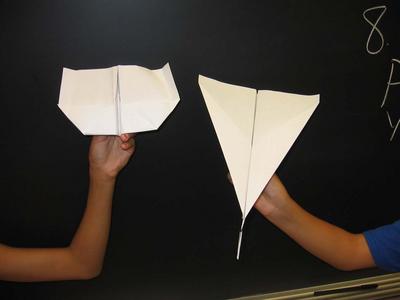 Paper Airplane Lesson Plan
In my effort to create an online archive of lesson plans that stresses quality over quantity, I've added another of my more successful science lessons to my website. It's about paper airplanes and the scientific method. Here's a brief overview of the lesson:
Students work with a partner to create two paper airplanes, each with a different design. They then fly the paper airplanes a set number of times and observe how far each goes. The lesson acts as a perfect introduction to the scientific method. Through it, students learn how to:
- Ask scientific questions
- Formulate hypotheses
- Clearly write procedures
- Collect data
- Draw conclusions
- Identify variables
The lesson has three stages: an observation period, a whole class experiment, and student experiments. An optional fourth stage would be a presentation of results. It also offers many opportunities for the incorporation of technology. Tech tips appear throughout the lesson.
Click here to download and view the lesson.
Online Presentations - Which site is best?
- About a month ago Tim Lauer posted about SlideShare, a site where you can upload a preexisting PowerPoint or OpenOffice slideshow. This is pretty handy since it means you no longer have to save your shows as a web page and then upload them to a server. Of course, the site is a also about social networking as users can tag presentations and comment on them as well. Here's SlideShare's major limitation: there's no way to publish a notes page. My slides are simple--they mostly contain a photo, a sentence, phrase, or sometimes just a single word. Bullet points are scarce in my presentations. Therefore, it's hard to get much information from them if I can't publish a notes page.
- Another site that I have tried is Thumbstacks. This site allows users to actually create, edit, and share the slideshow online. It's full of great features, unless you're into animations and transitions, it doesn't support those yet. But, once again, it doesn't have a notes page.
- Embedding a flickr slideshow works best if you have notes about each slide that you'd like to share with others. However, the slides come from photos in your archive and I can't imagine trying to turn my PowerPoint slides into images and uploading them to my flickr account.
Technorati Tags: Thumbstacks | SlideShare | teachers
Check out: Digital Cameras in the Classroom | Spreadsheets in the Classroom | Technology in the Classroom
Wednesday, November 29, 2006
Presenting an Internet Safety Program to Parents
It was two Tuesdays this past October when another teacher and I presented a program called the Wyoming Internet Safety Program for Parents. It was a pretty successful event--about 40 parents attended the first evening and I'd say that number increased to over 50 the second night. The feedback was very positive.
Planning for the event started at the end of the school year last year and continued through the summer with collaboration taking place on a Wikispaces wiki called Internet Safety for Parents. The wiki actually became a pretty good introduction to Internet safety as it combined the knowledge I was gaining by completing iSafe certification with the knowledge of my partner (who was already iSafe certified).
This post is for those thinking about planning an Internet safety program for their school community. Below are links to the various resources that we used in our program.
More Symmetry in Nature Resources
I have added some new information and more printables to the Symmetry in Nature page of my website. You can now learn about the symmetry of leaves and print some worksheets that require students to complete some engaging symmetry activities.
Technorati Tags: Internet Safety | wikis | teachers
Check out: Spreadsheets in the Classroom | Classroom Blogs | Digital Cameras in the Classroom
Planning for the event started at the end of the school year last year and continued through the summer with collaboration taking place on a Wikispaces wiki called Internet Safety for Parents. The wiki actually became a pretty good introduction to Internet safety as it combined the knowledge I was gaining by completing iSafe certification with the knowledge of my partner (who was already iSafe certified).
This post is for those thinking about planning an Internet safety program for their school community. Below are links to the various resources that we used in our program.
- WISPP Introduction - A link to the five slide introduction I created on Thumbstacks, a site for creating online presentations.
- WISPP Slideshow, Night 1 - Here is the whole slideshow from the first night that I uploaded to Slideshare. The slides are done in the Beyond Bullet Points format, so you won't get much information from them other than how we organized the presentation.
- Ryan Halligan Story - Ryan Halligan was a 7th grader who experienced cyberbullying so severe that he decided to committ suicide. iSafe has a video that we downloaded and showed. Check this site for information about Ryan and cyberbullying.
- Pew Internet & American Life Project - This site has lots of information about teen Internet usage that we used in our presentation.
- Netsmartz.org Blog Beware Quiz - I took a few questions from this quiz and added them to the slideshow.
- Include as many community groups that have an interest as possible. On the second night, we invited a counselor from the local youth services board to speak as well as some officers from the police department.
- Keep it short--our program lasted two hours, but took place over two nights instead of two very long hours in one night.
- Provide handouts.
- Keep up the momentum (if done well, your program will have parents to use the information right away). Parents at our program were given the chance to sign up for a listserve. The goal of the listserve is for us to send along any resources that we come across.
More Symmetry in Nature Resources
I have added some new information and more printables to the Symmetry in Nature page of my website. You can now learn about the symmetry of leaves and print some worksheets that require students to complete some engaging symmetry activities.
Technorati Tags: Internet Safety | wikis | teachers
Check out: Spreadsheets in the Classroom | Classroom Blogs | Digital Cameras in the Classroom
Subscribe to:
Posts (Atom)