The last few weeks have been quite exciting in the ed tech world. Apple's announcement of the iBook textbook has brought quite a bit of discussion about the future of textbooks. I was very interested in this development myself, but more so in the possibility of creating my own interactive book with iBooks Author. My interest in both of these products however eventually led me to looking into the iTunes U app for my iPhone and for the last week I have been spending a lot of time checking out what it has to offer and how it can help me be a better teacher.
To best see how it worked I decided to take a course myself. I'm a science teacher and I really enjoy teaching the life science standards at my grade level so I decided to take Ecosystems: Living Communities from The Open University. I love how the course is laid out, with a series of assignments and due dates that I can check off as I complete them (though I'm having a hard time keeping up!). Taking a class on my iPhone means I have no class to go to and no instructor to deliver the basic content. I don't miss it at all though because the videos that I watch for many of the assignments are better than listening to a lecture. And since I have Apple TV, I can watch the videos on my big screen television. There is more to the course though than watching videos. Readings are interspersed with the videos and those are done on the iBooks app.
I've really thought a lot about course design in relation to my classroom while taking this course. Showing videos and having students read from texts are not new and innovative teaching approaches. What has affected me so greatly is that I have been able to do it while sitting on my couch or at the tire store while waiting to get the oil changed in my car. The depth of resources available for learning now is greater than at any other time and I think it's incredibly important to give our students the opportunity to access them, not only in school, but also outside of school.
My school currently uses Blackboard and it seems to be the perfect tool for consolidating a number of resources for each of my classes. My goal is to gather and arrange these resources--photos, videos, worksheets, handouts, readings-- so that they support and enrich the learning going on in my classroom.
Monday, February 13, 2012


Corning's A Day Made of Glass Part 2
This is a pretty amazing vision of the future from Corning Glass. Check out how cool the technology could be in the future for classrooms (starts at 4:50).
- Community Activity Tables
- Interactive Wall Displays
Tuesday, January 03, 2012
Flipping the Classroom Part Two: The Nuts & Bolts
Back in September, I wrote a post about how I was planning to give the Flipped Classroom a try in my fifth grade math class. I've now tried it out during two chapters from my math textbook. The first chapter was one covering addition and subtraction of decimals. I chose this one because I knew that most of the content was review for my students and I wanted to make sure that the content they would be learning/reviewing at home was not too difficult. The second chapter covered basic fraction skills - GCF, LCM, comparing & and ordering, changing fractions to decimals, etc. Once again, I chose this chapter because I knew that the material would not be too challenging for my students to learn through a video.
Following is a description of how I went about implementing the flipped classroom approach. This was my first time giving it a shot, so it is definitely open to suggestions and is by no means the standard.
Videos on Blackboard
My district uses Blackboard as a content management tool. I use it to post homework, link to helpful websites, and much more. Since all of my students know how to use this tool, I decided to post my videos there. Speaking of videos, I use SMART Recorder and a microphone to record short lessons (I try to keep them to about 5-8 minutes) and then post them to SchoolTube. I then embed them into a page on Blackboard. I let my students know a couple days ahead of time that their homework will be to watch a video. This gives students without access to the Internet a chance to make arrangements to get to our computer lab (open each day after school) to watch the video.
I also use Blackboard to create short five-question quiz for my students to complete after watching each video. The multiple choice quiz is automatically graded and I can download a spreadsheet with all my students' scores. This feature allows me to see who has watched the video and gives me a rough assessment of who understood the lesson.
Meeting My Students' Needs
I set out on this project because I teach two accelerated math classes. I have some truly outstanding math students in these classes and they often need enrichment beyond the content we are currently covering. There are, however, also some students each year who struggle to keep up with the curriculum. Some have been misplaced into my class while others just haven't been exposed to some of the skills and concepts and need more time to learn them.
Flipping the classroom allows me to differentiate and meet the needs of both groups of students. By looking at the quiz scores from Blackboard I can get an idea of who needs a little more work and who is ready for enrichment. Students in need of more work often get a remediation worksheet and more of my time during class while the others get another assignment that goes beyond the curriculum. I monitor both groups throughout each class period and do my best to provide them with the best experience I can.
I have to say that I am excited about further applications of this approach. Taking learning beyond the walls of the school so that it can occur anytime and anywhere seems to me to be the way education in the 21st Century will take place. In my next post, I will talk about my learings from the Flipped Classroom approach.
Following is a description of how I went about implementing the flipped classroom approach. This was my first time giving it a shot, so it is definitely open to suggestions and is by no means the standard.
Videos on Blackboard
My district uses Blackboard as a content management tool. I use it to post homework, link to helpful websites, and much more. Since all of my students know how to use this tool, I decided to post my videos there. Speaking of videos, I use SMART Recorder and a microphone to record short lessons (I try to keep them to about 5-8 minutes) and then post them to SchoolTube. I then embed them into a page on Blackboard. I let my students know a couple days ahead of time that their homework will be to watch a video. This gives students without access to the Internet a chance to make arrangements to get to our computer lab (open each day after school) to watch the video.
I also use Blackboard to create short five-question quiz for my students to complete after watching each video. The multiple choice quiz is automatically graded and I can download a spreadsheet with all my students' scores. This feature allows me to see who has watched the video and gives me a rough assessment of who understood the lesson.
Meeting My Students' Needs
I set out on this project because I teach two accelerated math classes. I have some truly outstanding math students in these classes and they often need enrichment beyond the content we are currently covering. There are, however, also some students each year who struggle to keep up with the curriculum. Some have been misplaced into my class while others just haven't been exposed to some of the skills and concepts and need more time to learn them.
Flipping the classroom allows me to differentiate and meet the needs of both groups of students. By looking at the quiz scores from Blackboard I can get an idea of who needs a little more work and who is ready for enrichment. Students in need of more work often get a remediation worksheet and more of my time during class while the others get another assignment that goes beyond the curriculum. I monitor both groups throughout each class period and do my best to provide them with the best experience I can.
I have to say that I am excited about further applications of this approach. Taking learning beyond the walls of the school so that it can occur anytime and anywhere seems to me to be the way education in the 21st Century will take place. In my next post, I will talk about my learings from the Flipped Classroom approach.
Monday, December 05, 2011
Free Science Resources for Your Interactive Whiteboard
1. Photosynthesis Animation - A great animation that teachers can play/pause/replay to show what plants need to carry out photosynthesis. Use in a lesson on plants or food chains.
2. Levels of the Food Chain SMART Notebook File - Teach your students about producers and consumers and where they fit on the food chain. Includes interactive Flash animations that make for engaging assessments.
3. Properties of Light SMART Notebook File - Teach students about reflection, refraction, and transmission of light with this interactive Notebook file. Included are Flash animations that can supplement or even take the place of hands-on science activities.
4. Clouds Gallery Collection File - These mini-movies describe the weather which accompanies cumulus, cumulonimbus, cirrus, and stratus clouds. Display them on your interactive whiteboard so that your students can observe the cloud's appearance and then click the INFORMATION button to learn more about each cloud. Interactive flashcards!
5. Refraction in Prism Collection File - This animation shows light passing through a triangular prism. Your student can see the light refract inside and then separate into the colors of the spectrum.
2. Levels of the Food Chain SMART Notebook File - Teach your students about producers and consumers and where they fit on the food chain. Includes interactive Flash animations that make for engaging assessments.
3. Properties of Light SMART Notebook File - Teach students about reflection, refraction, and transmission of light with this interactive Notebook file. Included are Flash animations that can supplement or even take the place of hands-on science activities.
4. Clouds Gallery Collection File - These mini-movies describe the weather which accompanies cumulus, cumulonimbus, cirrus, and stratus clouds. Display them on your interactive whiteboard so that your students can observe the cloud's appearance and then click the INFORMATION button to learn more about each cloud. Interactive flashcards!
5. Refraction in Prism Collection File - This animation shows light passing through a triangular prism. Your student can see the light refract inside and then separate into the colors of the spectrum.
Sunday, October 23, 2011
Five Awesome Activities for Teaching Math with Your Interactive Whiteboard
1. Use the interactive angle to teach your students how to measure angles. The name says it all - this virtual manipulative is an excellent tool for getting students involved in building acute, right, and obtuse angles. The buttons on this tool allow students to build or take away one, five, or ten degrees at a time.

2. Show the relationships among the radius, diameter, and center of a circle with the interactive circle. Click on the circle to plot a point and then click the center to draw a radius. Define radius, click RESET, and then click on circle and the point directly across from it to create a diameter. Ask students to tell you the relationship between the radius and diameter. A full-featured version of the interactive circle is available in the Geometry Whiteboard Teacher Pack.
 3. Graph daily temperatures using a line graph tool. Show your students how line graphs show change over time by making a table of the weekly high temperatures and then dragging and dropping points on a grid to create the graph. MisterTeacher's line graph tool is part of the Representing Data Whiteboard Teacher Pack.
4. Build growing patterns out of triangles and rectangles. Use the Pattern Tool to create two rows of shapes that show a pattern growing from just a single triangle and rectangle to a triangle and two rectangles. Have students come to the whiteboard and drag the shapes into place to complete the next row of the pattern.
5. Represent integers less than zero with a scuba diver. Have your students use the drag and drop diver below the water to represent numbers less than one. Call out depths and have students move the diver up and down the number line. The scuba diver is part of the Integers Whiteboard Teacher Pack.
Technorati Tags: education | Smartboard | Interactive Whiteboard
Sunday, October 16, 2011
Free Interactive Whiteboard Resources @ Misterteacher.com
Take advantage of the free resources for your interactive whiteboard at MisterTeacher.com:


All of our WebQuests & student activities are free:
- Math Facts Flip Chart - This virtual manipulative is now free! A great resource for teaching addition, subtraction, multiplication, & division facts. This tool works just like a modular flip chart and is perfect for whole-class demonstrations, small group work, or learning center practice. Push the submit button for instant feedback.

- Fractions Flip Chart - This virtual manipulative is now free! Display this resource on your interactive whiteboard and show your students fractional parts of a circle, fractions, decimals and percents. Push the submit button for instant feedback.

- Alphabet Symmetry Tool - The ultimate tool for teaching transformations! Display this resource on your interactive whiteboard and use letters of the alphabet to teach linear and rotational symmetry as well as reflections, rotations, and translations.

- Interactive Food Chains & Webs - Eight awesome Flash mini-movies teach your students the organization of simple food chains & food webs. Get your students out of their seats and up to the whiteboard!

All of our WebQuests & student activities are free:
Sunday, October 02, 2011
Venn Diagrams for Teaching GCF & LCM

For many teachers, the Venn Diagram has become an indispensable instructional tool. A few years ago I discovered (for myself) how to use the Venn to teach greatest common factor and least common multiple.
A few years later I created a few Venn Diagrams using Adobe Flash so I could teach GCF & LCM on my SMARTBoard. Just click on the link below and you can use them too. A SMART Notebook gallery collection file will download to your desktop. Open the file and the Venn Diagrams are automatically added to your My Content folder.

You can download 4 more Venn Diagrams at MisterTeacher.com. In addition, you'll find 4 more activities on even/odd numbers and prime/composite numbers.
Check out more free SMARTBoard mini-movies: Number Properties | Virtual Manipulatives
Sunday, September 25, 2011
Right, Acute, Obtuse Angle Flash Cards for SMART Notebook


Teaching angles used to be something that I found very difficult. I remember trying numerous ways to get my students to see that the measure of an angle was determined by how much it opened, or rotated on its vertex.
Teaching this concept has become much easier on a SMARTBoard. Flash animations like the Angle Flash Card Mini-Movies pictured above show angles rotating on their vertices, making the concept come alive for students.
Try out these mini-movies on your SMARTBoard with this free download. Just click on the link below and a SMART Notebook gallery collection file will download to your desktop. Open the file and the angle flash cards are automatically added to your My Content folder.
 Types of Angles Flash Cards
Check out the rest of MisterTeacher.com's geometry Flash mini-movies with the Interactive Geometry Whiteboard Teacher Pack. It includes many more angle angle animations, including the Interactive Angle. You'll also find mini-movies that teach circle concepts as well basic geometry concepts like lines, segments, parallel, perpendicular and more.
Sunday, September 11, 2011
Flipping the Classroom
By now, you've probably heard of Salman Khan and the Khan Academy. I watched his TED video over the summer and I have to say I was impressed, though not totally sold that his ideas will transform education. I am interested enough though that I am giving the teaching approach he espouses--one that teachers Jonathan Bergman and Aaron Sams call the flipped classroom--a shot this year with my accelerated math classes.
Since my first days as a teacher back in the year 2000, I have worked hard to be on the cutting edge of technology integration while being careful not to jump on the bandwagon of trendy technologies that I feel have little use in the classroom. From blogs to wikis to digital cameras, I have used a lot of effective tools and now I am ready to try flipping my classroom.
What is the Flipped Classroom?
In the article The Flipped Class: Myth vs. Reality, the flipped class is described as being one where student/teacher interaction time is increased, the teacher is not the "sage on the stage", constructivist and direct instruction are blended, and much more. Mainly though, the flipped classroom is one where teachers record lessons for their students to view outside of the classroom (through a site like YouTube) and then use class time for doing assignments. The goal being to increase student/teacher and student/student interaction.
Read about the history of the flipped classroom at the Flipped Class Blog.
Transforming the Classroom
In their article How the Flipped Classroom is Radically Transforming Learning, Bergman and Sams identify a couple ways that flipping has transformed their classes:
You can join The Flipped Class Network to engage with other educators using the flipped class approach.
More Flipped Classroom Articles
The flipped classroom concept is also getting mentions outside of education. In Daniel Pink: Flip-Thinking, the popular author describes Karl Fisch's method of flipping his classroom and then describes how Seth Godin has applied "flip-thinking" to other areas of life. Though not an article, in this forum discussion titled "Remind me why I'm doing this" educator Steve Hegwood describes some of the intense resistance he is receiving from parents in his district. Finally, read about some more resistance to the Kahn Academy approach over at the Action-Reaction blog.
Hopefully there is enough information here to get you interested in the flipped classroom approach. I plan to start with the second chapter in my math textbook. I'll be posting updates on its progress here.
Since my first days as a teacher back in the year 2000, I have worked hard to be on the cutting edge of technology integration while being careful not to jump on the bandwagon of trendy technologies that I feel have little use in the classroom. From blogs to wikis to digital cameras, I have used a lot of effective tools and now I am ready to try flipping my classroom.
What is the Flipped Classroom?
In the article The Flipped Class: Myth vs. Reality, the flipped class is described as being one where student/teacher interaction time is increased, the teacher is not the "sage on the stage", constructivist and direct instruction are blended, and much more. Mainly though, the flipped classroom is one where teachers record lessons for their students to view outside of the classroom (through a site like YouTube) and then use class time for doing assignments. The goal being to increase student/teacher and student/student interaction.
Read about the history of the flipped classroom at the Flipped Class Blog.
Transforming the Classroom
In their article How the Flipped Classroom is Radically Transforming Learning, Bergman and Sams identify a couple ways that flipping has transformed their classes:
- Student Interaction Increases - When the classroom is flipped, the role of the teacher changes from presenter of content to learning coach. Because of this, the authors have been able to observe their students interacting:
"Since the role of the teacher has changed, to more of a tutor than a deliverer of content, we have the privilege of observing students interact with each other. As we roam around the class, we notice the students developing their own collaborative groups. Students are helping each other learn instead of relying on the teacher as the sole disseminator of knowledge. It truly is magical to observe. We are often in awe of how well our students work together and learn from each other."
- Flipping Changes Parent Interactions - In a flipped classroom, learning becomes the focus As a result, discussions with parents aren't centered on issues like behavior, but more important questions like are the students learning or not and if not, why?
You can join The Flipped Class Network to engage with other educators using the flipped class approach.
More Flipped Classroom Articles
The flipped classroom concept is also getting mentions outside of education. In Daniel Pink: Flip-Thinking, the popular author describes Karl Fisch's method of flipping his classroom and then describes how Seth Godin has applied "flip-thinking" to other areas of life. Though not an article, in this forum discussion titled "Remind me why I'm doing this" educator Steve Hegwood describes some of the intense resistance he is receiving from parents in his district. Finally, read about some more resistance to the Kahn Academy approach over at the Action-Reaction blog.
Hopefully there is enough information here to get you interested in the flipped classroom approach. I plan to start with the second chapter in my math textbook. I'll be posting updates on its progress here.
Thursday, September 08, 2011
MisterTeacher.com an International Sensation
Australia | Bahrain | Canada | Chile | China | Czech Republic | Egypt
England | Finland | Holland | Hong Kong | Indonesia |
Ireland | Israel | Italy | Jamaica | Nepal | Kenya | Lesotho
Malta | Mexico | New Zealand | Phillipines | Portugal
Puerto Rico | Romania |Saudi Arabia | Singapore | South Africa
St. Lucia | Turkey | USA | Vietnam | Zimbabwe
In countries all over the world, innovative teachers are enhancing their SMARTBoard lessons with MisterTeacher's Flash mini-movies. We love that no matter where in the world they are, educators see the value in using our interactive resources. To show our appreciation, we're having a sale of Earth-sized proportions.
Just head over to MisterTeacher.com, select the teacher pack (or teacher packs) of your choice, and enter the discount code WORLDSALE60 to enjoy this massive discount.
Click here to browse our Whiteboard Teacher Packs.
Right now subscribers to our newsletter can get
60% off their total order!
60% off their total order!
Just head over to MisterTeacher.com, select the teacher pack (or teacher packs) of your choice, and enter the discount code WORLDSALE60 to enjoy this massive discount.
Click here to browse our Whiteboard Teacher Packs.
Thursday, August 18, 2011
Fractions to Decimals to Percents Flip Chart Virtual Manipulative

Fractions to Decimals to Percents - use your SMARTBoard to teach your students these important conversions with the new Fraction Flip Chart Virtual Manipulative. Based on the popular manipulative, this flip chart features four modules that display visual fraction models, fractions, decimals, and percents. Show only the visual fraction and fraction and then continue on to equivalencies with decimals and percents and then click the SUBMIT button for instant feedback. Great for whole-class lessons or for use with small group instruction.
As with all of MisterTeacher's products, once you make your purchase, download and open the file, the flip chart is automatically added to the My Content folder in SMART Notebook! You'll be able to add it to your lessons whenever you want and write on it and resize it. Your purchase also comes with a Notebook file with directions and a list of Math Standards.
Sunday, August 14, 2011
Math Facts Flip Chart Virtual Manipulatives
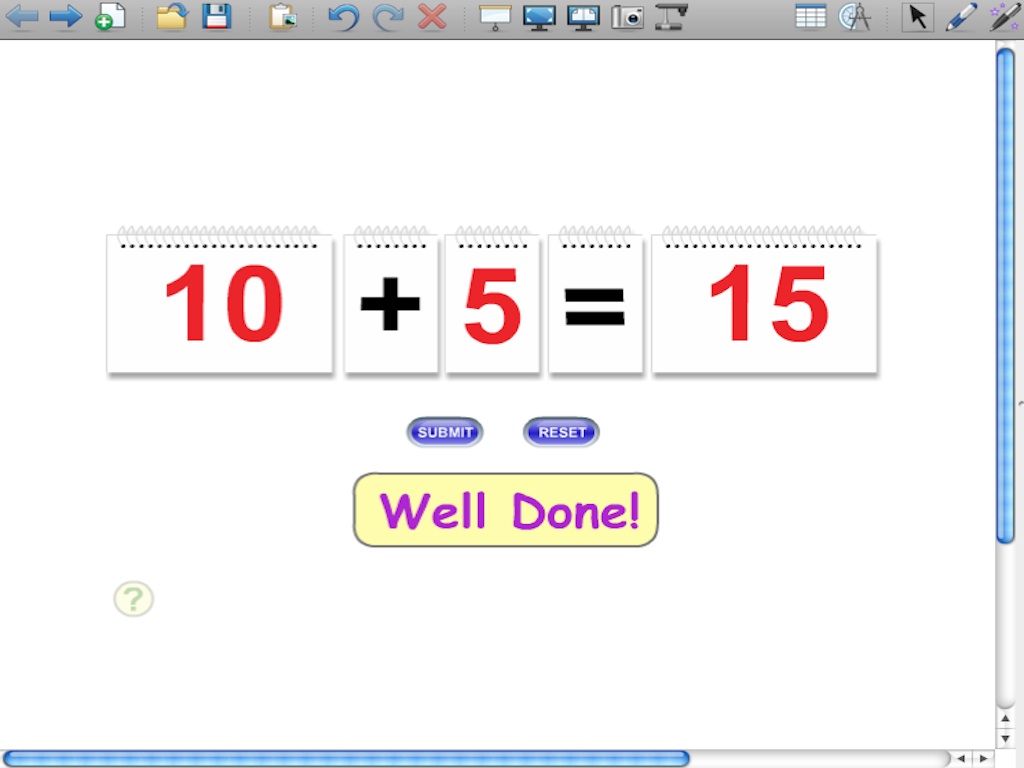
Use the Math Facts Flip Chart Virtual Manipulative to create number sentences to practice addition, subtraction, multiplication, and division facts and then click the SUBMIT button for instant feedback. Great for whole-class lessons or for use with small group instruction. Contains two number charts with numbers 0 - 99; one with 0 - 9; one operator chart with the operations +, -, x, and ÷; and one with an equals sign.
As with all of MisterTeacher's products, once you make your purchase, download and open the file, the flip chart is automatically added to the My Content folder in SMART Notebook! You'll be able to add it to your lessons whenever you want and write on it and resize it. Your purchase also comes with a Notebook file with directions and a list of Common Core Standards.
Friday, August 05, 2011
Top Technologies for Teachers Right Now
Technology and education is an extremely hot topic right now. There's no doubt about it. But get a room full of ten different educators, administrators, and policymakers and you will find ten different opinions on the use of technology in the classroom.
Less Hardware and Gadgets, More Networking and Collaboration
Technological teaching aids such as whiteboards are always nice to have around, but would it be better that students have some form of compatible technology that allows sharing and collaboration between classmates and teachers? It's a tough call, but honestly I think more technology should be getting to the hands of students. If students have access to computers or some mobile device (tablet, netbook, laptop) in their classrooms, there are huge amounts of potential for collaboration between students, educators, and even the rest of the world.
So really, when it comes to the topic of best technologies for teachers, there should be less emphasis on teaching/classroom gadgets like whiteboards and more attention paid to the hundreds of online services that allow group communication, brainstorming, and project management. The technologies are already out there; it's up to teachers and administrators to find them and make compelling uses of them that teach our current generation of students how to responsibly and intelligently use the technology at their fingertips every day.
Best Services Available
The value of a private (or public) network in which students and educators can exchange ideas and questions easily is huge. These networks allow teachers to communicate with students outside of the classroom, enabling them to answer quick questions or point students to other resources to help them understand classroom material.
Networks are also great for students working on group projects. Having their group on a visible network that a teacher can see allows them to discuss their roles in the project, help manage the project, and schedule meetings for the project outside of class.
While the go-to network for educators (Ning) has recently moved away from its free services, a great private network you can use alternatively is Yammer. While it is primarily used by business, it also accepts those with .edu email addresses, and many schools have started to use Yammer as their primary private network for communication. Best of all, you can create groups in Yammer for different classes or group projects.
Another alternative is to use Twitter. While this web service is primarily public, there are plenty of third party apps that allow you to communicate privately or publically between select Twitter users. Getting students to understand services like Twitter is incredibly important as students will learn the value and practice of online marketing.
For creative projects or presentations, Voicethread is an amazing service that is incredibly easy to learn and use. In addition to this option, Slideshare is another great service used by educators and professionals. You can also upload your own lessons to these media outlets, making your course material available to your students at all times.
By-line:
This guest post is contributed by Barbara Jolie, who writes for online classes. She welcomes your comments at her email Id: barbara.jolie876@gmail.com.
Sunday, July 24, 2011
Direct to Notebook SMARTBoard Resources
 It's now easier than ever to increase the number of resources in SMART Notebook's My Content folder. Beginning this August all Whiteboard Teacher Pack downloads from MisterTeacher.com will come with a gallery collection file that contains the Flash mini-movies. Open the file and the Flash mini-movies that you have purchased are automatically added to the My Content folder. The mini-movies will show up in their own file and be instantly available to add to your SMART Notebook lessons.
New Licensing Options
Also this fall, MisterTeacher.com will be offering new licensing options for the Whiteboard Teacher Packs.
- Classroom License - This option allows teachers unlimited use of the Flash mini-movies on an interactive whiteboard within one classroom. The mini-movies can be copied from one computer to an unlimited number of computers within the same classroom.
- Site License - This license allows a download to one computer and then the option to save and share the Flash mini-movies, teacher guides, and printable assessments with all teachers throughout one school building. This is an incredible deal for technology coordinators, curriculum specialists, department chairs, or anyone else looking to purchase SMARTBoard resources for a large group of teachers at a very reasonable price.
New Whiteboard Teacher Pack Bundles
Several of the Whiteboard Teacher Packs have been combined to form discounted bundles.
- Math Whiteboard Teacher Pack Bundle - Purchase every whiteboard teacher pack at a discounted rate. With over 200 Flash mini-movies, dozens of interactive activities, and over 60 printable assessments, this bundle will instantly enhance your SMARTBoard lessons!
- K-2 Math Whiteboard Bundle - Over 90 Flash mini-movies covering K-2 math standards were selected for this bundle.
- Fraction, Decimal, Percent Bundle - The fraction, decimal, & percent teacher packs were combined for this bundle. Get 0ver 60 mini-movies for a fraction of the price!
- Geometry & Transformations Bundle - Teach a number of geometry standards from the early grades through high school. This bundle includes three virtual manipulatives!
Check out other resources on MisterTeacher.com:
Science Whiteboard Teacher Packs | Web-Based Student Activities | Virtual Manipulatives
Science Whiteboard Teacher Packs | Web-Based Student Activities | Virtual Manipulatives
Sunday, May 15, 2011
New Pattern Tool Whiteboard Teacher Pack for K-2 Teachers
 All new for K-2 teachers, the Pattern Tool Whiteboard Teacher Pack includes a virtual manipulative that teachers can download and insert into their interactive whiteboard software. With this tool, you can teach your primary (K-2) students how to analyze patterns, build common patterns (ab, aab, abc, etc.), extend them, create similar patterns. You can also create growing patterns and build student capacity in sorting and classifying shapes.
Purchase the Pattern Tool Whiteboard Teacher Pack and the Pattern Tool is yours to keep. Keep it on a folder on your computer or add it to the My Content folder in SMART Notebook. Add as many mini-movies to your activities as you want and write on them, resize them, and/or put multiple mini-movies on the same slide.
Preview and download the mini-movie or take your instruction further with the Pattern Tool Whiteboard Teacher Pack. This packs include the virtual manipulative, printable worksheets, and a teacher's guide. More information.
Sunday, March 06, 2011
New Science Whiteboard Teacher Packs
 While nothing can replace a hands-on science classroom, using science animations on an interactive whiteboard can certainly come close. In the weeks ahead, misterteacher.com will be releasing several Science Whiteboard Teacher Packs. Each teacher pack consists of activities that are highly interactive and are meant to supplement your hands-on science activities.
Teach about the properties of light with misterteacher's first science Whiteboard Teacher Pack release. Your students can shine a flashlight off of a mirror to learn about the law of reflection. You can teach refraction, or the bending of light, by with a refraction block animation. Drag the flashlight from right to left and watch the light bend inside the block. Finally, students will understand the difference between transparent, translucent, and opaque materials by dragging three different lenses in the transmission of light mini-movie.
There are several more mini-movies in the properties of light teacher pack. In addition, you'll find a teacher's guide and printable assessments. Click here to check it out.
Check out MisterTeacher.com's SMART Accredited Math Whiteboard Teacher Packs
Wednesday, February 02, 2011
Five YouTube Channels Your Students Should Watch
When educators consider viable teaching tools, YouTube almost seems like a bad word. However, as more high school and college systems train teachers with methods to integrate technology into lessons, instructors are discovering that YouTube is more than just a video of a random person playing karaoke night at home. YouTube provides teachers with easy access to source of credible video clips that can be used to bolster lessons, provide review material or simply present material for a lesson in a novel and entertaining manner.
However, YouTube can be overwhelming even for regular users. Yet teachers and students can find credible sources of information through “channels.” YouTube channels are collections of videos produced by the same person or group. For example, there is a channel called Mr. Robb’s Math Videos that exhibits the math lessons Mr. Robb has given each day. It began as a means of review, but is now archived in brief video clips for all to use. Therefore, depending on the subject matter one teaches and the grade level, YouTube has a wide variety of channels that are appropriate and effective for classroom use. Here are a few:
- PBS (Public Broadcasting Service) - One of the leaders in matching materials with classroom instruction, PBS breaks down a diverse output of information for teaching (history, politics, science, literature and a host of other subjects) into manageable video clips. On this site you will find interviews, lessons and documentaries. It is difficult not to find something to use here.
- Kaplan SAT and ACT Prep - The Kaplan SAT and ACT Prep channel offers concise demonstrated strategies for different types of questions posed on the SAT and the ACT covering math, writing and reading. These tips serve as a good introduction to the test and are great for reviewing purposes.
- History Channel - If one can swiftly move past recent uploads of “Pawn Stars” and “Axe Men,” there are excerpts from the History Channel’s reputable library of documentaries that cover topics such as: Benjamin Franklin, Rosa Parks, the Cold War and Edgar Allan Poe. There is also a “This Day in History” feature and a photo gallery. This channel would serve as a good place for students to start when searching for an historical topic for a project or paper.
- Associated Press - The channel provided by the Associated Press is an effective and credible source for current events, history or other journalistic research. This channel is a must-use for courses in journalism, as it supplies viewers with coverage of global events, and information on people from the world of celebrity to the battlefields of war.
- National Geographic - National Geographic offers a comprehensive channel that mirrors the popular magazine and television content. Clips cover animals, geography, the environment, scientific discoveries, politics, exploration, etc. With over 350 thousand subscribers, it's one of the most popular educational channels.
Both students and teachers can make use of YouTube in learning, whether used directly in the classroom or independently for assignments and research. The channels offer a method for sifting through some of the non-educational output and guaranteeing credible and accurate sources of information. As students (and teachers) become more tech savvy, YouTube can bring history and life to the classroom in a way no textbook can.
--Lindsey Wright is a music tutor, computer repair consultant, and substitute teacher in Washington State.
Saturday, January 22, 2011
Using Animations on Your Smartboard

This is a guest post from TeachStreet. TeachStreet is a website dedicated to providing online and local classes as well as connections to reliable math tutors and science tutors.
Although interactive whiteboards make it a whole lot easier to draw, erase and reposition images on a screen, there are may other advantages to using them in your classroom. One of these is they allow teachers to insert and use Flash animations to make content come alive! The real advantage is that the whiteboards provide animations and interactive activities that regular whiteboards can’t provide.
Flash animations are simple animations created using Adobe Flash software. Many concepts that appear as static images in a textbook or handout can be brought to life or made interactive using animation . Below are some concepts that can be taught effectively on your interactive whiteboard using Flash animations.
Photo By: Ebeam
- Rotational Symmetry - You could use your interactive whiteboard to explain the concept the old fashioned way (you know, by bisecting the same shape several times at different angles). Or, you could take advantage of a whiteboard’s animation features and show a spinning shape, demonstrating in real-time just what rotational symmetry is. The animations on this page, for example, take the capital letter “N” and the capital letter “H” and spin them, showing in a clear way that the shapes can rotate less than a full turn and still appear the same. Of course, a teacher could do this with a power point presentation, but the difference here is that the students are involved. They press the button to turn the shape, and thus they are more engaged with the material than they would be looking at slides.
- Representing Decimals - Flash animations also provide added interactivity. Decimals, for example, can be a difficult concept for some young students to grasp. This decimal grid, which initially shows a square divided into ten parts, shows in a visual, interactive way, just what 0.7 or 0.4 means in practical terms. When they push the button to change the grid from tenths to hundredths, they’ll instantly see how 0.4 and 0.40 are exactly the same number.
Photo By: Ebeam
Tuesday, January 04, 2011
New Math Mini-Movies for Your SMARTBoard Lessons
 Number Properties
Use your interactive whiteboard to teach the distributive, commutative, and associative properties with updated mini-movies available for free at MisterTeacher.com. Interactive and highly visual, your students will watch numbers switch places (commutative), parentheses move from one group of numbers to another (associative), and see how numbers outside of parentheses distribute.
A number of new mini-movies have been added that will allow you to turn your interactive whiteboard into a tool for creating bar, line, and circle graphs. With these animations you can use your own data teach your students to:
- read & interpret bar graphs with intervals of 1, 2, 5, and 10.
- graph temperature data over the course of a week or year on a line graph.
- create circle graphs by estimating sizes of sectors on the graphs.
The Representing Data Whiteboard Teacher Pack includes all eight mini-movies, a teacher guide, and printable assessments.
Check out MisterTeacher.com's SMART Accredited Math Whiteboard Teacher Packs
- Decimals - Models, comparing, and ordering
- Geometry - Lines, angles, and circles
- Fractions - Models, comparing, and ordering
- Integers - Models, comparing, and ordering
- Dominoes - Addition, subtraction, and family of facts
Prepare for Standardized Tests with Online Student Activities
Sunday, November 28, 2010
Transformations on Your SMARTBoard
The word transform means "to change." In geometry, a transformation changes the position of a shape on a coordinate plane. Teach your students how to visualize the moving of a shape from one position to another with the Transformations Whiteboard Teacher Pack. Appropriate for grades 4 - 8, you can use the Flash mini-movies to teach students how to:
- Predict and describe positions and orientations of two-dimensional shapes after transformations such as reflections, rotations, and translations.
- Draw the results of translations, reflections, and rotations of objects in the coordinate plane, and determine properties that remain fixed.
The teacher pack includes the following:
- 12 Flash mini-movies including the Alphabet Symmetry Tool Virtual Manipulative.
- A Printable Teacher Guide
- Printable Assessments
Subscribe to:
Posts (Atom)